Admin console
Admin console: the marketplace view of each booking.
Give operators a clear record of the service, its schedule and its current operational state.
The details together.
A service display name makes the booking understandable alongside its scheduled time, recorded status and payment information.
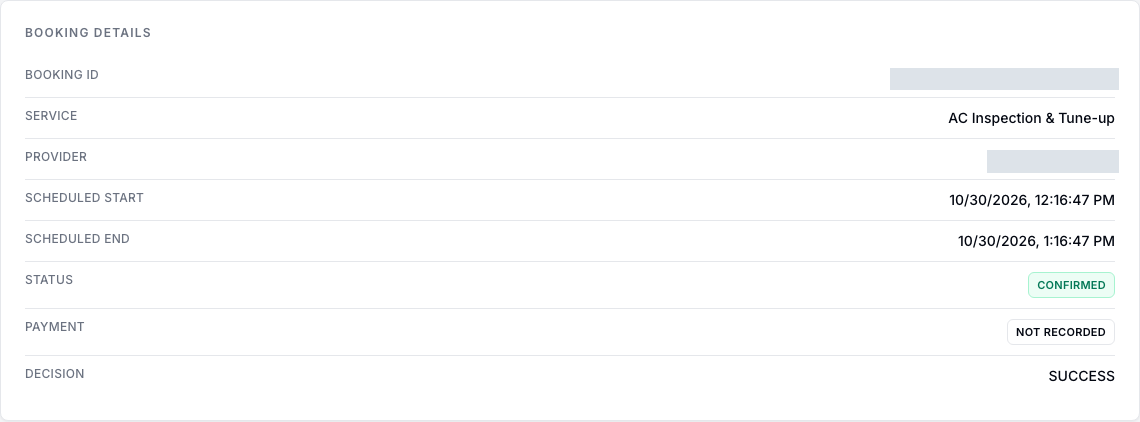
Booking status and payment are separate facts.
A confirmed booking does not by itself prove that payment was received. The console keeps the recorded payment state visible alongside the booking decision.
Use the overview to inspect the record before deciding what operational follow-up is needed.
Marketplace oversight, with booking context.
- Review the service name and scheduled time in the booking overview.
- Inspect booking status alongside the recorded payment state.
- Use booking filters and the Complete, No-show and Cancel actions shown in the marketplace demonstrations.
- Review the same booking that the provider sees, from the marketplace operations perspective.
Service configuration and operational boundaries.
Evidence status describes configuration, recorded demonstrations or integration scope. It does not certify production readiness.
Configured per service
Service coverage
Set at-home fulfilment and coverage zones for a service. Address checks treat every address as covered when no zones are configured.
Implemented · production use not established
Membership cancellation scope
Operators process policy-based cancellations and refunds for unused membership sessions. This is the membership scope described on the home page; it does not establish renewal readiness.
Partly integrated
Assignment and matching
Provider assignment and zone matching are not connected end to end to booking creation. Automatic dispatch is not demonstrated.
Requires engineering
Immediate dispatch
ASAP dispatch and live tracking are not available in the current scheduled-slot model.
Your next step
Give operators the context to act.
Map the records, booking states and responsibilities your operations team needs to review.
Request a demo